There is a specific moment every operations manager knows well.
It is 3 PM. A client has called to say their scheduled visit did not happen. You open WhatsApp and scroll back through 200 messages trying to figure out who was assigned to that account and whether they actually went. You find nothing useful. You call the executive. He says he went. The client says he did not. And you have no way to know who is telling the truth.
That moment is exactly why field employee tracking apps exist. And it is the exact problem ClickTask is built to solve.
Visibility Is Not The Same As Surveillance
Before getting into what ClickTask does, it is worth saying this clearly: most companies that resist implementing field workforce tracking are not resistant to accountability. They are resistant to the idea of it looking like surveillance.
That is a fair concern. But there is a real difference between a system that monitors employees and one that gives everyone, manager and field staff both, a structured record of work.
When tasks are assigned digitally and completed digitally, the record belongs to everyone. The field executive has proof of every visit they made. The manager has a clear view of what was completed and what was not. The client can be told exactly what happened and when. That is not surveillance. That is just how a well-run operation should work.
What Breaks Down When Field Teams Scale Beyond 15 People
Small field teams can be managed through a mix of calls, WhatsApp updates, and trust. Once you cross 15 to 20 people covering different zones, that system starts producing daily problems.
Here is what that actually looks like in practice:
- Tasks assigned over phone calls get forgotten or misremembered because there is no written record at the point of assignment
- Managers spend 2 to 3 hours daily just following up on whether things happened, instead of doing actual work
- Expense claims arrive at month-end in a pile, with no way to verify which visits they relate to
- Performance reviews are based on gut feeling because there is no reliable data to look at
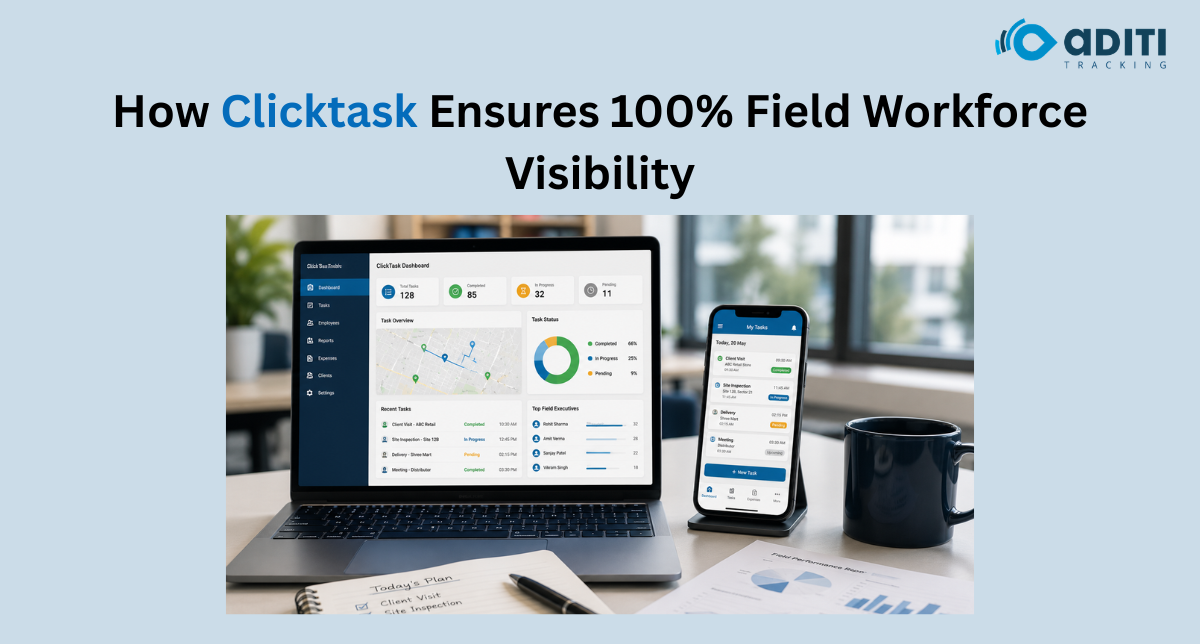
The field employee tracking app solves all of these, not by adding more complexity, but by putting the task assignment, the status update, and the expense claim into one place that everyone accesses through their phone.
The Clicktask Difference In Day-To-Day Operations
ClickTask is not a GPS tracker with a task feature bolted on. It is a task management solution with location context built in, which is a different thing entirely.
What this means practically:
- A manager assigns a task to a field executive through the app, with location, time, and details attached
- The executive updates the task status from the field as work gets done, in real time
- Expense claims are submitted through the same app at the point of the expense, not reconstructed later
- The manager sees the full picture on a dashboard without making a single phone call for status
Industries Where This Kind Of Accountability Matters Most
Field employee tracking apps like ClickTask tend to have the biggest impact in operations where the field team is the product, where the quality of what the company delivers depends entirely on what happens during that site visit or client call.
Some of the industries where this shows up most clearly:
- FMCG and distribution companies where reps are covering 8 to 12 outlets a day
- Facility management operations where teams are working across multiple client sites simultaneously
- Field service and maintenance companies where job completion needs to be documented
- Pharma companies managing medical representative visits across doctor territories
Conclusion
The field employee tracking app also levels the playing field for high performers. When good work is documented, it gets recognised. When a field executive closes 10 visits in a day and the system shows it, that record exists. In companies without tracking, the loudest person in the team often gets the most credit. With tracking, the data decides.
ClickTask by Aditi Tracking helps businesses achieve real-time field workforce visibility through digital task management, live status updates, expense tracking, and performance monitoring in a single platform.
Book a Free Demo or Get in Touch Today to discover how ClickTask can help your organisation build greater accountability, operational transparency, and control across distributed field teams.
FAQs
1. What is a field employee tracking app?
A field employee tracking app helps businesses monitor task assignments, employee activities, visit statuses, and location data in real time, improving operational visibility and accountability.
2. How does ClickTask improve field workforce visibility?
ClickTask provides a centralized platform where managers can assign tasks, track progress, monitor field activities, and review updates without relying on phone calls or manual reporting.
3. Can ClickTask help reduce disputes between clients and field employees?
Yes. ClickTask maintains detailed task records with timestamps and status updates, making it easier to verify whether a visit or task was completed as scheduled.
4. How does ClickTask improve task accountability?
By digitally recording task assignments, completion updates, and expense submissions, ClickTask creates a transparent workflow that helps managers measure performance and recognise high-performing employees accurately.
5. Can managers track field employees in real time?
Yes. Field employee tracking apps allow managers to view task progress, visit statuses, and location-based updates as they happen. This enables faster decision-making, quicker responses to delays, and better coordination across distributed field teams.


 Smart Fleet
 Cool Bus
 Clicktask
 CommutePulse
 Wastetrail